How to Rank Higher on Google Maps (The No-BS Guide for Local Businesses)
You want to know how to rank higher on Google Maps. Makes sense—that little map pack at the top of search results is prime real estate, and right now your competitors are living there rent-free while you're stuck on page two wondering what you did wrong.
Here's the thing: ranking on Google Maps isn't magic. It's not about knowing some secret Google doesn't want you to know. It's about understanding what Google is looking for and systematically giving it to them.
Let me break it down for you. No fluff. No "it depends." Just the stuff that actually moves the needle.
How Google Maps Rankings Actually Work
Before we get tactical, let's understand the game we're playing.
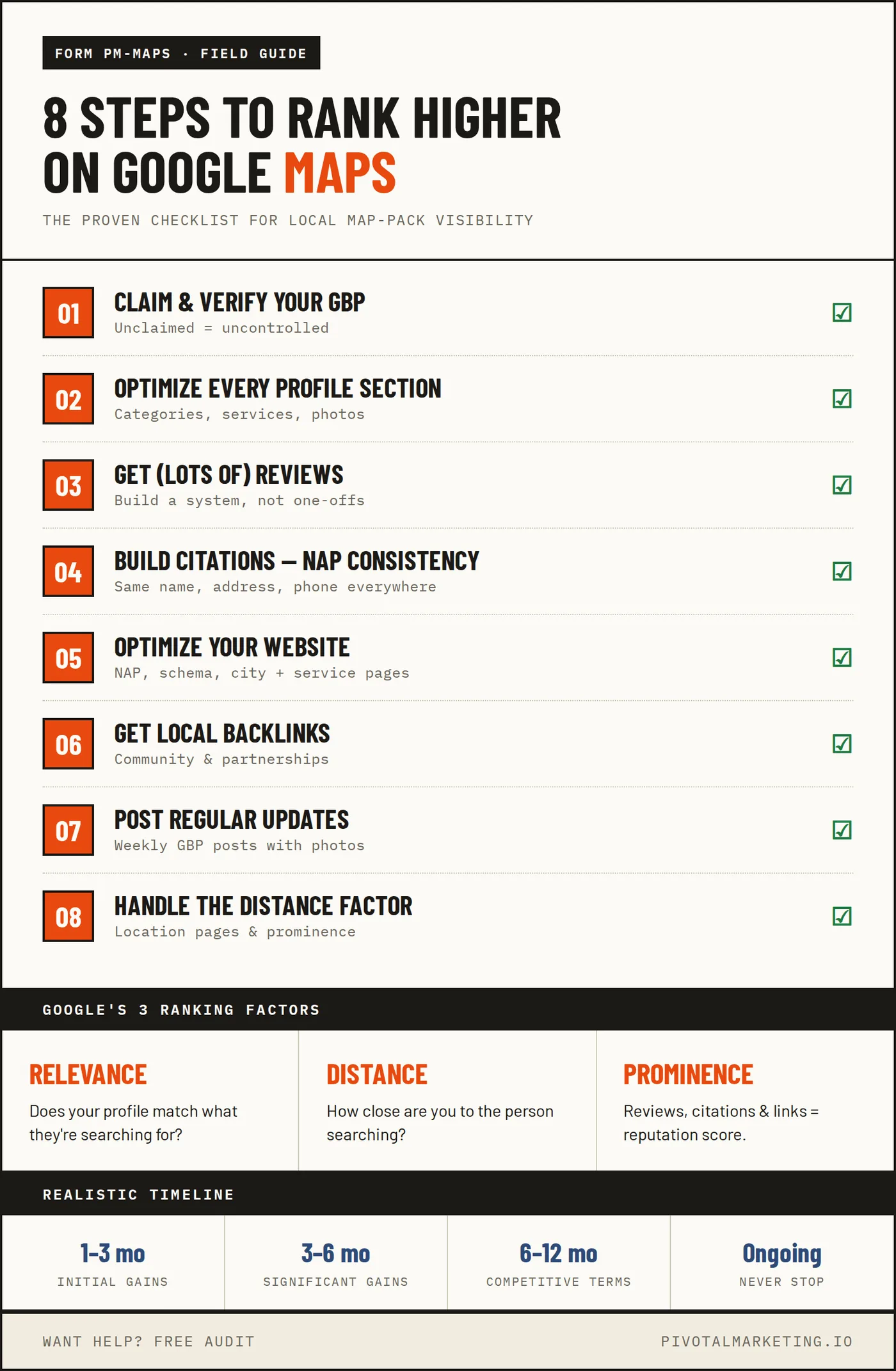
When someone searches "plumber near me" or "best electrician in Minneapolis," Google has to decide which businesses to show in that coveted 3-pack at the top. They use three main factors:
1. Relevance
Does your business match what the person is searching for? If someone searches "emergency plumber" and your Google Business Profile says you do plumbing, that's relevant. If it also mentions "24/7 emergency service," that's MORE relevant.
2. Distance
How close is your business to the searcher? This one's tricky because you can't exactly pick up your shop and move it closer to customers. But there are ways to work with this (more on that later).
3. Prominence
How well-known and trusted is your business? This is measured through reviews, citations, links, and overall online presence. Think of it as your business's reputation score.
The businesses that nail all three factors get the top spots. Simple in theory, complicated in practice.
Step 1: Claim and Verify Your Google Business Profile
I know, I know—you've probably already done this. But let me ask you: did you do it RIGHT?
A shocking number of businesses have:
- Unclaimed profiles (someone else could claim it)
- Unverified profiles (you don't have full control)
- Duplicate profiles (confuses Google and customers)
- Profiles with wrong information (death sentence for rankings)
Action items:
1. Go to business.google.com
2. Make sure YOUR business is claimed by YOU
3. Verify it if you haven't (usually via postcard or phone)
4. Search for duplicate listings and get them removed
5. Ensure every piece of information is accurate
This is foundation work. Skip it at your own peril.
Step 2: Optimize Every Section of Your Profile
Your Google Business Profile has a lot of fields. Google gives you ranking credit for filling them out. Many businesses fill out the basics and call it a day. Don't be those businesses.
Business Name
Use your real business name. Not "Joe's Plumbing - Best Plumber in Minneapolis 24/7 Emergency Service." That's called keyword stuffing, and Google will penalize you for it.
Just... your actual name. The one on your license. The one customers know you by.
Categories
This is huge. Pick the most specific primary category that describes your main service. "Plumber" beats "Contractor." "Emergency Plumber" beats "Plumber" if that's your specialty.
Add secondary categories for other services you offer. Most businesses can use 3-5 relevant categories.
Address or Service Area
If you have a physical location customers visit, use your address. If you go to customers (like most home service businesses), set up a service area instead and hide your address.
Pro tip: Your service area should be realistic. Don't claim you serve the entire state if you actually only work in a 30-mile radius.
Hours
Keep them accurate. Nothing tanks trust faster than showing up to a business that's supposedly open and finding a closed sign.
Also—set holiday hours in advance. Google rewards proactive profile management.
Business Description
You get 750 characters. Use them wisely. Include:
- What you do
- Who you serve
- What makes you different
- Service areas (naturally mentioned)
- A call to action
Don't stuff keywords awkwardly. Write for humans first, search engines second.
Services
List every service you offer with descriptions. This helps Google understand exactly what searches you should show up for.
Example: Instead of just "Plumbing," add:
- Drain cleaning
- Water heater installation
- Sump pump repair
- Leak detection
- Pipe replacement
Each service can have its own description. Use them.
Products
Even service businesses can use this. List your service packages, maintenance plans, or specialty offerings.
Photos
Businesses with photos get more direction requests and clicks. Aim for:
- Cover photo: Your best work or team photo
- Logo: Clean, professional
- Exterior: So customers can find you
- Interior: If applicable
- Team photos: People trust faces
- Work photos: Before/after, in-progress shots
- Equipment: Your truck, tools, etc.
Upload new photos regularly. 5-10 per month is a good target.
Step 3: Get (Lots of) Reviews
Reviews are the closest thing to a ranking hack that actually works. More reviews + higher ratings = higher rankings. It's that simple.
But getting reviews requires a system:
Make it stupidly easy
Create a direct link to your review page and share it everywhere:
- Text it to customers after service
- Put it on invoices
- Include it in email signatures
- Create a QR code for business cards
Ask at the right moment
The best time to ask is immediately after you've solved their problem and they're happy. Not two weeks later via email when they've forgotten who you are.
Ask consistently
Don't ask 20 customers this month and then forget for six months. Steady review velocity (new reviews coming in regularly) signals to Google that you're actively serving customers.
Respond to every review
Yes, even the bad ones. Especially the bad ones. Google tracks your response rate, and it's a ranking factor.
For positive reviews: Thank them specifically. Mention what you helped them with.
For negative reviews: Apologize, take responsibility, offer to make it right offline. Never argue publicly.
Step 4: Build Citations (NAP Consistency)
Citations are mentions of your business name, address, and phone number (NAP) on other websites. They're like votes of confidence for your business.
The catch: They need to be consistent. If your address is "123 Main St" on Google but "123 Main Street" on Yelp, that inconsistency hurts you.
Priority citation sources:
1. Data aggregators: Foursquare, Data Axle, Localeze, Neustar
2. Major directories: Yelp, Yellow Pages, BBB, Apple Maps
3. Industry directories: Angi, HomeAdvisor, Houzz (for home services)
4. Local directories: Chamber of Commerce, local business associations
How to build citations:
1. Audit your existing citations (use a tool like BrightLocal or Moz Local)
2. Fix any inconsistencies
3. Build new citations on relevant directories
4. Claim and update existing listings
This is tedious work, but it matters. Consider it the unglamorous foundation of local SEO.
Step 5: Optimize Your Website for Local Search
Your website and Google Business Profile work together. A weak website = weaker Maps rankings.
Must-haves for local SEO:
NAP on every page
Your name, address, and phone should be in the footer of every page, formatted consistently with your Google profile.
Location pages
If you serve multiple areas, create a page for each one. Not thin doorway pages—actual useful content about your services in that area.
Service pages
Each major service should have its own page with:
- Detailed description
- Benefits
- Process explanation
- Local relevance (mention areas served)
- Call to action
Schema markup
LocalBusiness schema helps Google understand your business details. It's code that goes on your website—a developer can add it in 30 minutes.
Mobile-friendly design
Most local searches happen on phones. If your site doesn't work well on mobile, you're losing customers AND rankings.
Fast loading
Slow sites rank worse. Period. Aim for under 3 seconds to fully load.
Step 6: Get Local Backlinks
Links from other websites are a major ranking factor, and LOCAL links are especially valuable for Maps rankings.
Where to get local links:
- Local news sites (get featured in articles)
- Chamber of Commerce membership
- Local business associations
- Sponsoring local events or teams
- Partnering with complementary businesses
- Community involvement (charities, schools)
- Local blogger outreach
How to actually get them:
1. Create linkable content: "Average cost of [service] in [city]" articles do well
2. Be newsworthy: Community involvement, awards, interesting projects
3. Build relationships: Network with local business owners
4. Guest posting: Write for local blogs and publications
This takes time, but local links are gold for Maps rankings.
Step 7: Post Regular Updates
Google Business Profile has a "Posts" feature that most businesses ignore. Big mistake.
Posts show Google your profile is active and give you more ways to show up in search.
Types of posts to publish:
- What's new: Company updates, new services
- Offers: Seasonal promotions, discounts
- Events: Community involvement, open houses
- Tips: Helpful advice related to your industry
Best practices:
- Post at least once per week
- Include a photo every time
- Add a call-to-action button
- Keep text under 300 words
- Use relevant keywords naturally
It takes 10 minutes a week and signals to Google that you're an active, engaged business.
Step 8: Handle the Distance Factor
Remember how I said distance is one of the three main ranking factors? Here's how to work with it:
You can't:
- Fake your location
- Use a virtual office address (Google will catch this)
- Claim a service area you don't actually serve
You can:
- Optimize for neighborhoods: Create content targeting specific neighborhoods and suburbs
- Build location-specific pages: If you serve Maple Grove and Eden Prairie, create pages for each
- Earn reviews mentioning locations: When customers mention your city in reviews, it helps
- Local link building: Links from local sources in specific areas help you rank there
The businesses that rank outside their immediate area do so by being SO prominent that they overcome the distance factor. That means more reviews, more citations, more links than the closer competitors.
Common Mistakes That Kill Your Rankings
Let's talk about what NOT to do:
Keyword stuffing your business name
"Joe's Plumbing - Best Plumber Minneapolis 24/7 Emergency Plumber"
Google will suspend your listing. Just use your real name.
Fake reviews
Google's algorithm is sophisticated. They catch fake reviews and penalize businesses. Plus, it's ethically gross.
Inconsistent NAP
Different addresses, phone numbers, or business names across the web confuse Google and hurt your rankings.
Ignoring negative reviews
Leaving bad reviews without a response looks terrible to potential customers AND hurts your engagement metrics.
Set-and-forget mentality
Your competitors are actively optimizing. If you're not, you're falling behind.
Using a PO Box or virtual office
Google wants real, physical locations. They will catch this and suspend your listing.
Tracking Your Progress
How do you know if this stuff is working?
Metrics to track:
- Map pack rankings: Search your main keywords and note where you rank
- GBP Insights: Views, searches, actions (calls, direction requests, website clicks)
- Review count and rating: Month over month
- Website traffic from organic search: Use Google Analytics
Tools that help:
- Google Business Profile dashboard (free)
- BrightLocal (paid, great for local tracking)
- Google Search Console (free)
- Google Analytics (free)
Check these monthly. Look for trends, not day-to-day fluctuations.
How Long Does This Take?
Real talk: ranking on Google Maps isn't instant.
1-3 months: Foundation work shows initial improvements. Basic optimizations start taking effect.
3-6 months: Significant ranking improvements for moderate-competition keywords. Review velocity builds.
6-12 months: Competitive keywords start moving. You're building real authority.
Ongoing: The businesses that stay at the top never stop optimizing. This isn't a project—it's a practice.
If someone promises you page one in 30 days, they're either lying or using tactics that will get you penalized.
Wrapping Up
Ranking higher on Google Maps comes down to:
1. Having a fully optimized Google Business Profile
2. Getting consistent, genuine reviews
3. Building accurate citations across the web
4. Having a locally-optimized website
5. Earning links from local sources
6. Staying active with posts and updates
None of this is secret or complicated. It's just work—consistent, methodical work over time.
The businesses that dominate Maps aren't necessarily better at their trade. They're just better at showing Google they're trustworthy, relevant, and prominent. For a trade-specific example, see this guide to SEO for plumbers.
Want help implementing this for your business? Check out our local SEO services or request a free audit to see where you currently stand.
---
Word count: ~2,200 words. Last updated: December 2025.